Large semantic models don’t usually fail because of their size at rest — they fail during refresh.
The reason is simple: during a full refresh, the engine needs to hold both the existing model and the new data in memory at the same time.
During refresh, VertiPaq builds new data structures while the old ones are still in memory. For a short period, you effectively have two copies of the model. That’s what pushes you over the limit.
In a recent article on the Tabular Editor blog, I covered how Semantic Model Scale-out can be used to deal with exactly this problem.
This post is about how to actually implement it.
When this approach makes sense
This pattern is useful when refresh operations require significantly more memory than the final model size.
Typical scenarios include:
- Initial dataset loads
- Historical backfills
- Periodic full refreshes
- Large models operating close to SKU limits
In these scenarios, refresh fails even though the model fits perfectly fine when it is loaded.
The idea behind refresh scale-out
Power BI Semantic Model Scale-out introduces two types of replicas:
- A Read/Write node used for refresh
- One or more ReadOnly nodes used for queries
Normally, this is a query performance feature.
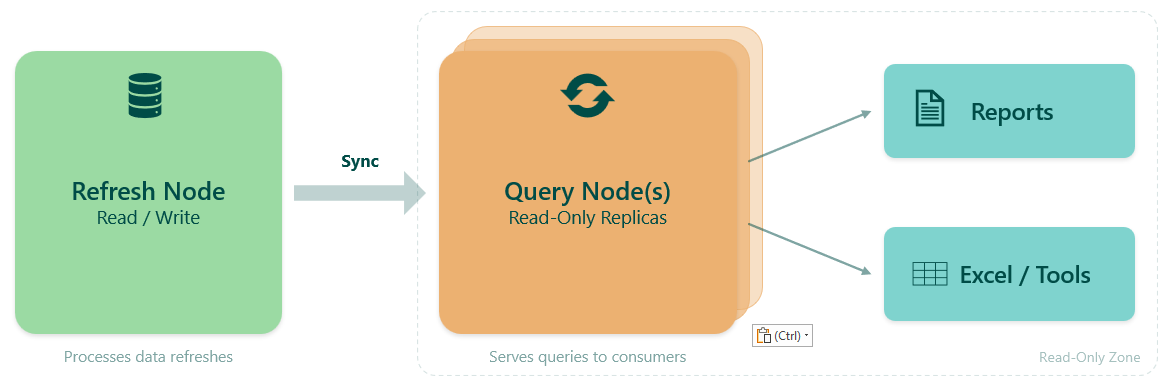
But if you disable automatic synchronization, it becomes something else: A way to fully control refresh.
The pattern is simple (once automatic sync is disabled):
- Clear the model
- Rebuild it from scratch
- Only then expose it to users
Because you clear first, VertiPaq never needs to hold two copies of the model simultaneously.
This pattern uses semantic model scale-out to isolate refresh operations from query workloads, allowing refresh and query execution to operate independently.
Prerequisites
Before using Semantic Model Scale-out, a few prerequisites must be in place.
At the tenant level, scale-out must be enabled:
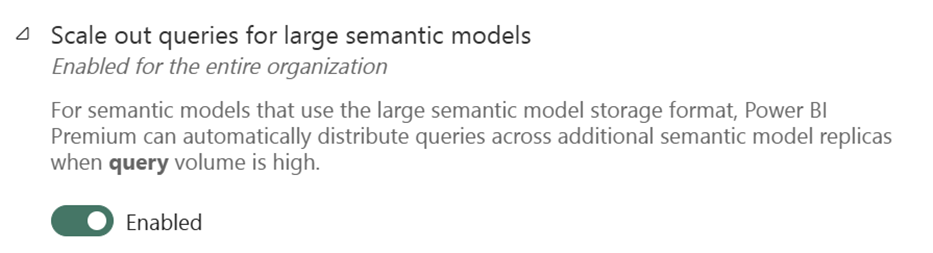
This setting is typically enabled by default, but it’s worth verifying.
At the semantic model level:
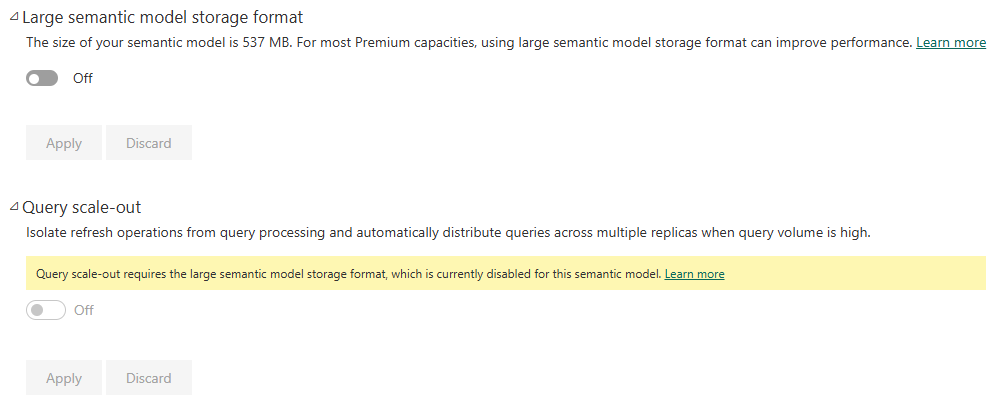
- Query scale-out depends on the large semantic model storage format being enabled
- Query scale-out must be enabled
Without large model storage format, scale-out cannot be activated.
End-to-end workflow
The workflow splits into two phases. The Refresh Phase handles model setup, clearing, and rebuilding. The Sync Phase controls when users see the updated data. Step 0 is a one-time setup — once scale-out is enabled, and auto sync is disabled, the remaining steps form the repeating refresh cycle.
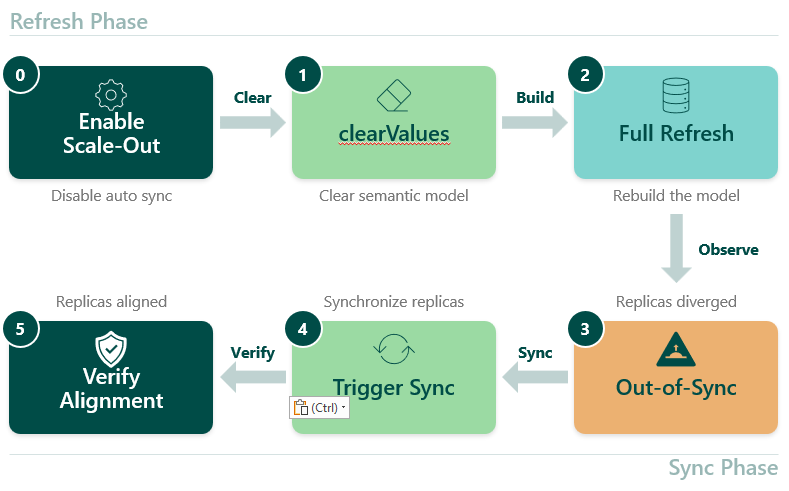
The API examples in this post use the Fabric CLI. Any tool that can call the Power BI REST API works equally well — PowerShell is a common alternative.
Step 0 — Enable scale-out and disable auto sync
Scale-out can be enabled either through the Fabric UI or via API. For controlled refresh workflows, using the API provides the most flexibility.
To use scale-out for refresh optimization, you need to:
- Enable replicas
- Disable automatic synchronization
This is not about preventing partial states from propagating. It’s about controlling when replicas are updated.
fab api -A powerbi groups/{groupId}/datasets/{datasetId} -X patch -i scaleout.json
{
  "queryScaleOutSettings": {
    "autoSyncReadOnlyReplicas": false,
    "maxReadOnlyReplicas": 1
  }
}
This configuration:
- enables a ReadOnly replica
- disables auto sync
- allows controlled refresh workflows
It is also possible to enable scale-out directly in the semantic model settings in the Fabric UI.
Step 1 — Clear the semantic model
Before rebuilding the model, clear it with the Enhanced refresh API.
fab api -A powerbi groups/{groupId}/datasets/{datasetId}/refreshes -X post -i clear.json
{
  "type": "clearValues",
  "commitMode": "transactional"
}
This step is the whole point.
You are explicitly telling VertiPaq:
👉 “Throw everything away before we start.”
After this:
- The model is empty
- Queries against Read/Write return nothing
- Memory usage is minimal
This removes the need to hold two copies of the model in memory.
Step 2 — Rebuild the model
Now rebuild the model with the same API:
fab api -A powerbi groups/{groupId}/datasets/{datasetId}/refreshes -X post -i full.json
{
  "type": "full",
  "commitMode": "transactional"
}
Because the model was cleared first, only one version is built in memory.
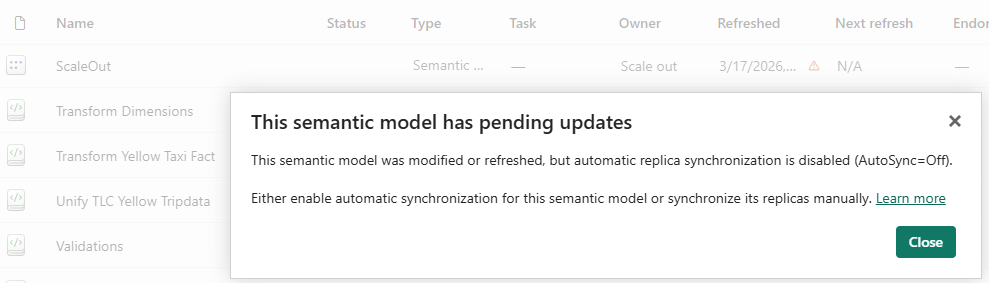
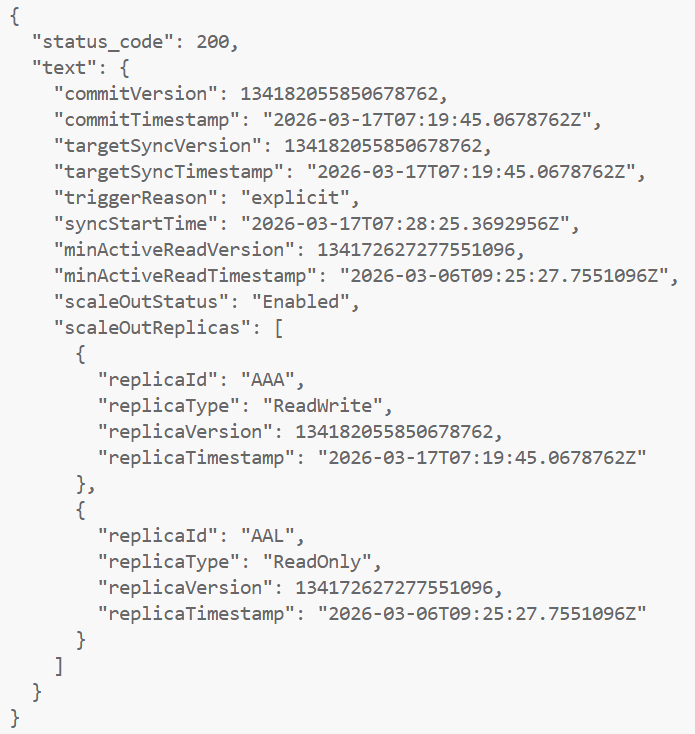
Step 3 — Observe replicas out of sync
After refresh completes, the system is now intentionally inconsistent.
fab api -A powerbi groups/{groupId}/datasets/{datasetId}/queryScaleOut/syncStatus
Example:
ReadWrite replica → new version
ReadOnly replica → old version
This means:
- Refresh is complete
- Users still see old data
This is not a bug. This is the feature.
It allows you to:
- validate the refreshed model
- run checks
- control when users see new data
Step 4 — Synchronize replicas
When ready, trigger the sync API:
fab api -A powerbi {groupId}/datasets/{datasetId}/queryScaleOut/sync -X post
This call is asynchronous.
That means:
- It returns immediately
- Replicas are still out of sync
- Sync happens in the background
To monitor use the syncStatus API:
fab api -A powerbi {groupId}/datasets/{datasetId}/queryScaleOut/syncStatus
Step 5 — Replicas aligned
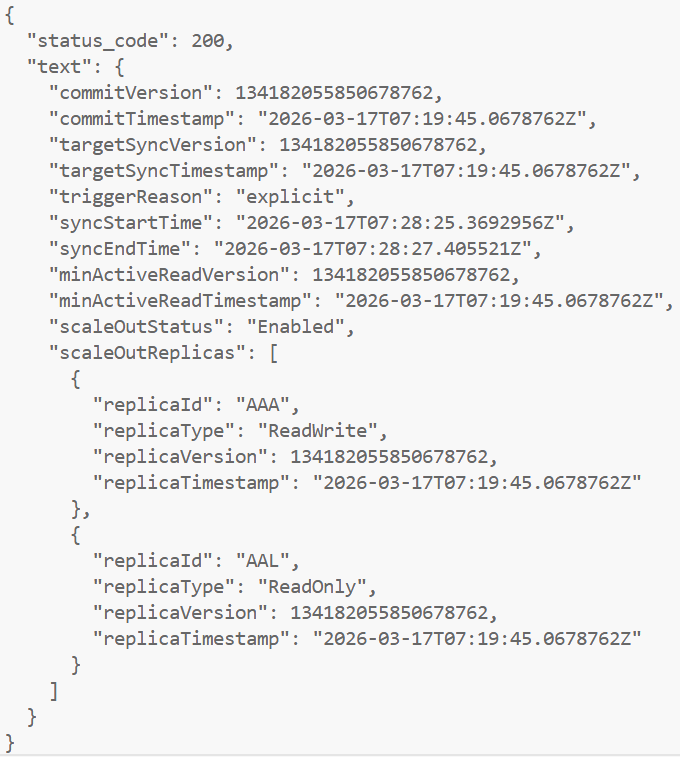
After sync completes:
ReadWrite replica → new version
ReadOnly replica → same version
Now:
- All replicas are aligned
- Queries return new data
This is the moment users see the update.
Connecting to replicas for validation
This is where things get really practical.
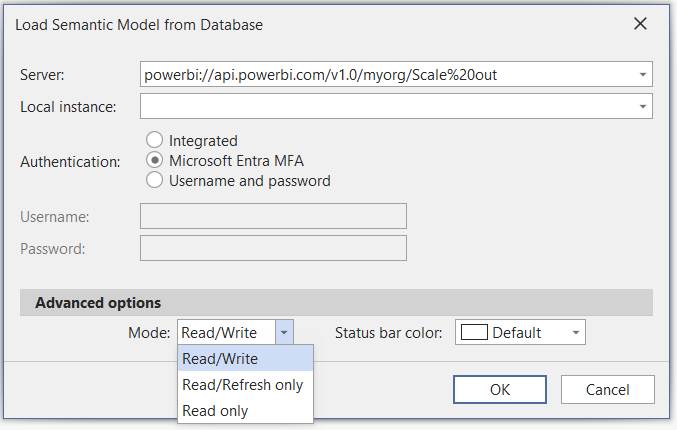
Tabular Editor 3
Tabular Editor 3 allows you to choose:
- Read/Write
- Read only
- Read/Refresh only
This is extremely useful.
A pattern I use:
- Connect to Read/Write
- Validate the model
- Compare with ReadOnly
- Then sync
Power BI Desktop
Power BI Desktop always connects to ReadOnly by default.
That’s actually perfect:
- Users never see half-processed data
- Reports only update after sync
For debugging, you can force Read/Write mode with ?readwrite in the connection string. Use it carefully.
Using SemPy for automated validation
If you are working with automated refresh pipelines, it is also possible to validate the refreshed model programmatically before synchronizing replicas.
The evaluate_dax function in SemPy supports connecting to the Read/Write replica using the use_readwrite_connection parameter.
This makes it possible to:
- run validation queries against the refreshed model
- verify data quality and row counts
- execute automated checks before exposing the new version to users
Example:
from sempy.fabric import evaluate_daxdf = evaluate_dax(
    dataset="your_dataset_name",
    dax_string="EVALUATE ROW(\"RowCount\", COUNTROWS('FactTable'))",
    use_readwrite_connection=True
)
This approach is used in production scenarios to validate data before synchronization, and was highlighted to me by Gerhard Brueckl and Michael Kovalsky in the context of real-world scale-out implementations.
Requirements and limitations
Semantic Model Scale-out is powerful, but it comes with a few important requirements and trade-offs.
Operational requirements
Using scale-out for refresh optimization requires more than just flipping a setting.
You need:
- API-based refresh orchestration
- Control over refresh sequencing (clear → full → sync)
This introduces additional operational complexity compared to standard refresh.
In practice, this makes the pattern more suitable for enterprise scenarios than simple models.
Certain model changes (such as role or data source updates) require temporarily disabling scale-out.
Refresh behavior considerations
This pattern changes how refresh behaves.
After running clearValues:
- The Read/Write node is empty
- Queries against it will return no data
At the same time:
- The ReadOnly node continues to serve the previous version
This is exactly what enables controlled refresh, but it’s important to understand when troubleshooting.
SQL Server Profiler limitation
With scale-out enabled, query activity runs on the ReadOnly node.
This has an important implication:
- SQL Server Profiler cannot capture query activity via
?readonly
In practice:
- Profiler works well for refresh troubleshooting
- It does not work for query analysis in this setup
You’ll need another approach to monitor query workloads.
When this pattern is not needed
For models using well-designed incremental refresh, this pattern is often unnecessary.
If only a small portion of data is processed during refresh, memory pressure is already reduced, and scale-out may not provide additional benefit.
Capacity considerations
Although replicas do not count against the semantic model memory limit, they still consume capacity resources.
Scale-out should therefore be used with awareness of the overall workload running on the capacity.
Why this approach is powerful
This pattern separates:
- Processing (Read/Write)
- Queries (ReadOnly)
That gives you:
- lower peak memory usage
- fewer refresh failures
- controlled data exposure
- ability to validate before sync
And importantly:
Read-only replicas do not count toward the semantic model memory limit, and you are not charged for their memory usage.
That’s effectively free headroom.
Scale-out vs SKU scaling
A common workaround for handling large refresh operations is to temporarily scale up the capacity. This can provide additional memory and compute resources, and in many cases, it allows the refresh to complete successfully.
However, scaling the SKU does not change how the refresh process works. VertiPaq will still build new data structures while the previous version of the model remains in memory, meaning the temporary memory spike is still present. You are effectively increasing the available headroom, rather than reducing the underlying memory requirement.
Semantic Model Scale-out takes a different approach. By clearing the model before processing and rebuilding it from scratch, it removes the need to hold multiple copies of the model in memory during refresh.
If refresh orchestration is already automated using APIs, scale-out is typically the better solution. It directly addresses the root cause of refresh memory pressure, rather than compensating for it.
This makes it particularly useful for scenarios such as initial dataset loads, large historical backfills, and periodic full refresh operations.
Conclusion
Large semantic models don’t fail because they are too large.
They fail because refresh temporarily requires more memory than the capacity can provide.
Semantic Model Scale-out solves this by changing how refresh works.
By clearing the model first and synchronizing replicas afterwards, you avoid holding multiple copies of the model in memory.
For large models running close to capacity limits, this can be the difference between unreliable refreshes and a stable, controlled pipeline.